Blog ·
How we hide private data in bug report screenshots
Screenshots make bug reports useful and leak e-mails, phone numbers and card numbers. Ozvi covers them in the browser, on a copy of the page, before a single pixel exists. Here is how.
A bug report without a screenshot is a guessing game. A bug report with a screenshot is a copy of whatever was on your customer's screen: their customers' e-mail addresses, phone numbers, the card on file, a health note typed into a form. That image then sits in your tracker, gets pasted into Slack and ends up in an AI assistant's context.
Ozvi's widget takes the screenshot for the person reporting the bug. It also makes sure the private parts never become pixels. This article explains how, and what you can turn up or down.
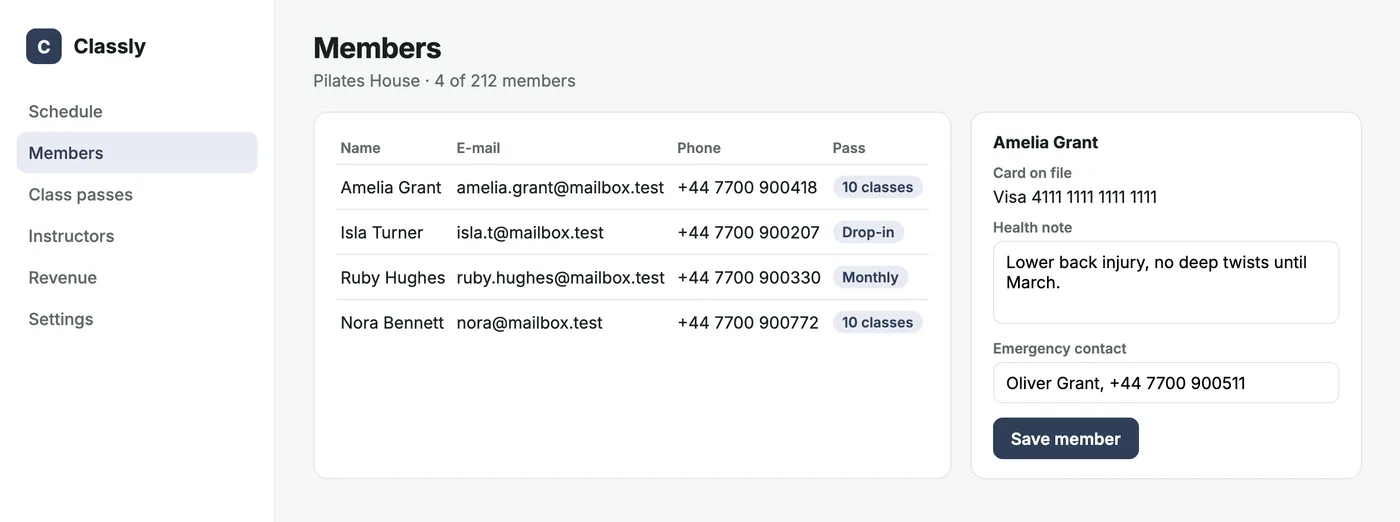
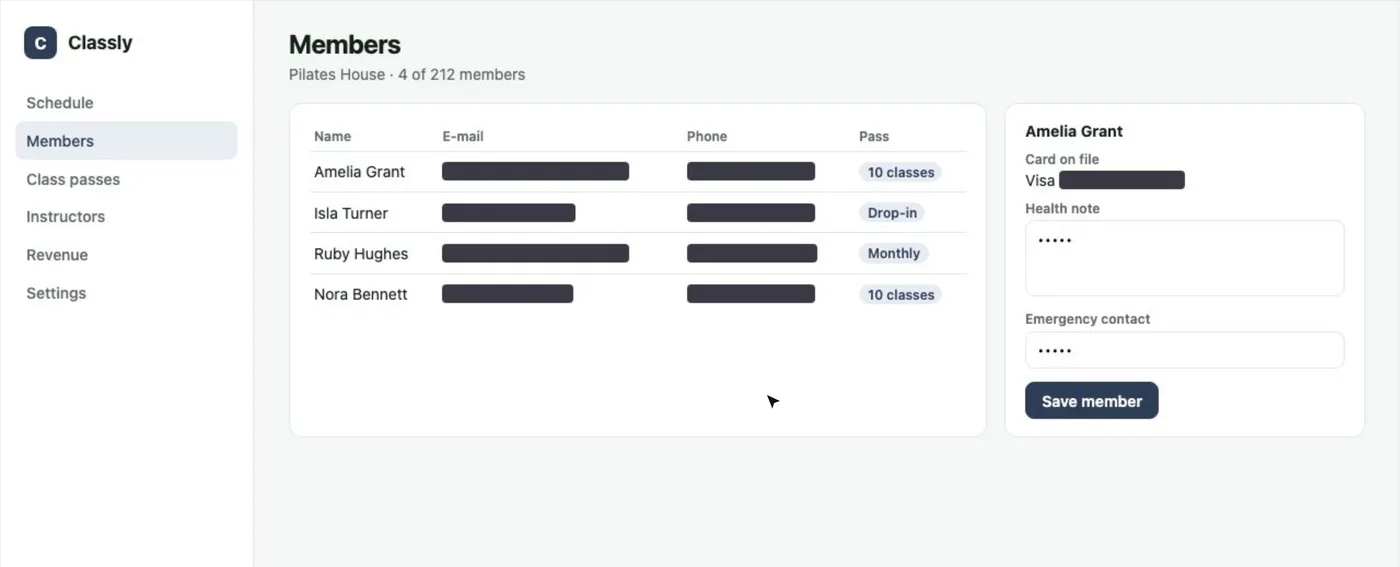
Mask the copy, not the image
The usual approach is to take a screenshot and blur parts of it afterwards. Blur is a filter on pixels that already contain the data, and blurred text can often be reconstructed. Painting a box over the image is better, but the original image still exists for a moment, and anything the box misses is gone.
Ozvi never has an unmasked image. The widget draws the screenshot from a copy of the page (the DOM is cloned, then rendered to a canvas). Every element of that copy passes through the masking step before it is drawn. The page the person is looking at is never touched, so nothing flickers.
const image = await domToBlob(document.documentElement, {
  // runs on the clone, before anything is drawn
  onCloneNode: (clone) => maskScreenshot(clone, mode),
});
If masking throws for any reason, there is no screenshot at all. Never an unmasked one.
What is covered without any setup
- Form values. Every input, textarea and select. A filled field shows a few dots, so the team still sees that something was typed.
- E-mail addresses, phone numbers, IBANs, card numbers and tokens found in text anywhere on the page. Card numbers are Luhn-checked; phone numbers need 9 to 15 digits, so dates and prices stay readable.
- Anything inside
data-ozvi-mask, including images, canvas and video.
Covered text is not removed. Its colour turns transparent and its element gets a solid background, so the layout stays exactly the same and the team can still see where things were.
Names and other things without a shape
An e-mail address has a recognisable shape; “Amelia Grant” does not. For names, notes and anything else that is private in your app, add one attribute:
<td data-ozvi-mask>{member.name}</td>Health care, finance: cover everything
Some apps should not send any text at all. Turn the default around: everything is covered except what you explicitly allow, such as the navigation and the page title.
window.OzviConfig = { mask: "all" };

// and in your markup:
<nav data-ozvi-unmask>…</nav>
<h1 data-ozvi-unmask>Members</h1>
The team still sees the layout and where something broke, without any of the data.
The rest of the report
The screenshot is only one part of what the widget sends. The steps before the report, the failed requests and console errors are masked in the browser too, before they are kept in memory. Secrets in addresses (tokens, passwords, e-mails in a path or a parameter) are replaced, request headers are never recorded, and request or response bodies are kept only for failed requests and only if you turn that on, cut short and masked with the same patterns. The Ozvi server masks everything a second time. Bug reports are visible to the person who sent them and to your team, nobody else.
Where to read more
See it in 20 seconds
Watch the phone numbers disappear in a short, or the full walkthrough.